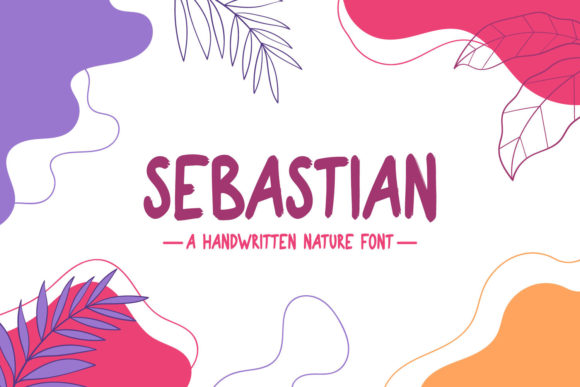
Sebastian: Elevating Your Design with a Brushed Handwritten Aesthetic
In the crowded landscape of digital typography, finding a font that balances personality with professionalism can feel like searching for a needle in a haystack. Many designers and brand owners settle for generic scripts that lack character or overly complex calligraphy that sacrifices readability. This is where Sebastian enters the conversation. As a simple, beautiful, and brushed handwritten font, it offers a distinct visual voice defined by smooth curves and organic flow. It is not merely a typeface; it is a design tool specifically engineered for fashion branding, editorial layouts, and lifestyle projects where elegance meets approachability.
However, the allure of a handwritten style often leads creators down a path of misuse. Because Sebastian looks effortless, many assume it requires little thought to implement. This misconception is the primary reason why some projects fail to achieve the polished look they desire. Understanding the nuances of this font—its strengths, its limitations, and its ideal applications—is crucial for anyone looking to add it confidently to their toolkit. By avoiding common pitfalls, you ensure that the final result is not just legible, but truly captivating.
The Misconception of Versatility
One of the most frequent mistakes designers make is treating every handwritten font as a universal solution. While Sebastian is incredibly versatile within its niche, it is not a substitute for a sans-serif workhorse or a formal serif. A common error is using Sebastian for long paragraphs of body text. Due to its brushed nature and connected letterforms, extended reading can cause eye fatigue. The smooth curves that make it beautiful in headlines become visual noise when scaled down and repeated over hundreds of words.
The better approach: Reserve Sebastian for high-impact areas. Use it for headlines, pull quotes, logo marks, or short social media captions. Pair it with a clean, neutral sans-serif font for body copy. This contrast allows the unique character of Sebastian to shine without overwhelming the reader. For instance, in an editorial spread, use Sebastian for the article title and a minimalist geometric sans-serif for the main text. This hierarchy guides the eye and maintains a professional standard.
Overlooking Kerning and Spacing
Handwritten fonts often come with pre-set kerning pairs, but they are rarely perfect for every context. A significant oversight occurs when users apply Sebastian without adjusting the spacing between letters, particularly in all-caps settings or when used at very large sizes. Tight spacing can cause the brushed strokes to collide, creating illegible blobs of ink rather than distinct characters. Conversely, excessive spacing can break the natural flow of the script, making it look disjointed and awkward.
Practical advice: Always manually adjust tracking and kerning when using Sebastian in logos or large headers. Pay close attention to where the brush strokes enter and exit each letter. If two curved lines are too close, increase the space slightly to let the "air" circulate around the letters. This small adjustment significantly enhances readability and perceived quality. In fashion branding, where whitespace is often associated with luxury, generous spacing around Sebastian can elevate the brand’s perceived value.
Ignoiring Context and Color Contrast
Another area where projects often stumble is the interaction between the font and its background. Sebastian’s brushed texture means it has varying stroke widths. Placing it over a busy, high-contrast background can cause the thinner parts of the letters to disappear. This is a critical usability issue, especially for digital marketing materials where quick comprehension is key. Some entrepreneurs mistakenly place light-colored text over light backgrounds, assuming the aesthetic appeal outweighs legibility concerns.
To avoid this, always test your design in grayscale first. If the text blends into the background, the contrast is insufficient. When using Sebastian, opt for solid, clean backgrounds or use a subtle overlay to dampen background noise. For example, if you are designing a wedding invitation or a boutique product label, ensure the paper texture or background image does not compete with the delicate curves of the font. High contrast ensures that the smooth curves remain sharp and defined, preserving the integrity of the design.
Neglecting License and Usage Rights
Before downloading or purchasing any typeface, it is essential to understand the licensing terms. A surprising number of freelancers and small business owners skip this step, leading to potential legal issues later. Sebastian, like many premium fonts, may have different licenses for personal use, commercial use, and web embedding. Using a personal license for a client’s commercial branding project is a violation of intellectual property rights and can result in hefty fines or forced rebranding.
Check before you commit: Verify whether the license covers the specific medium you are working on. Does it include app embedding? What about merchandise? If you are creating a logo for a client, ensure you have the appropriate commercial license. Investing in the correct license upfront saves time, money, and stress. It also supports the type designer, encouraging the creation of more high-quality fonts like Sebastian in the future.
Pairing with Clashing Styles
Typography is about harmony. A common aesthetic mistake is pairing Sebastian with another decorative or handwritten font. This creates visual competition, confusing the viewer about where to look. Two scripts fighting for attention result in a cluttered and amateurish design. Similarly, pairing it with an overly rigid, industrial slab serif can create a jarring disconnect that feels unintentional rather than eclectic.
The most effective pairings for Sebastian are understated and complementary. Consider these combinations:
- Modern Sans-Serif: Creates a contemporary, clean look ideal for tech-forward fashion brands or modern blogs.
- Classic Serif: Adds a touch of tradition and authority, perfect for editorial magazines or luxury packaging.
- Minimalist Geometric: Enhances the organic feel of Sebastian by providing a structured counterpoint.
By keeping the secondary font simple, you allow Sebastian to serve as the emotional anchor of the design. This balance ensures that the communication remains clear while still delivering the desired aesthetic impact.
Evaluating Quality Before Implementation
Not all versions of a font are created equal. When sourcing Sebastian, ensure you are downloading from a reputable foundry or marketplace. Low-quality rips or unofficial conversions often contain missing glyphs, broken ligatures, or inconsistent stroke weights. These technical flaws can ruin a design at the last minute, forcing a rushed replacement that compromises the creative vision.
Test the font thoroughly before committing to a full project. Type out the entire alphabet, both uppercase and lowercase. Check for special characters and numerals if your project requires them. Look for consistency in the brush texture. Does the weight vary naturally, or does it look digitally distorted? High-quality fonts like Sebastian are crafted with attention to these details, ensuring that every character feels part of a cohesive whole.
In conclusion, Sebastian is a powerful asset for those who understand its proper application. It is not just a font; it is a stylistic choice that conveys warmth, elegance, and human touch. By respecting its limitations, adjusting spacing meticulously, ensuring proper contrast, securing the right license, and pairing it wisely, you can unlock its full potential. Whether you are a seasoned designer or a budding entrepreneur, approaching Sebastian with intention and care will yield results that you will love. Add it confidently to your projects, and watch how its smooth curves transform ordinary designs into memorable experiences.