Mastering Bentley Script: How to Use This Delicate Handwritten Font Effectively
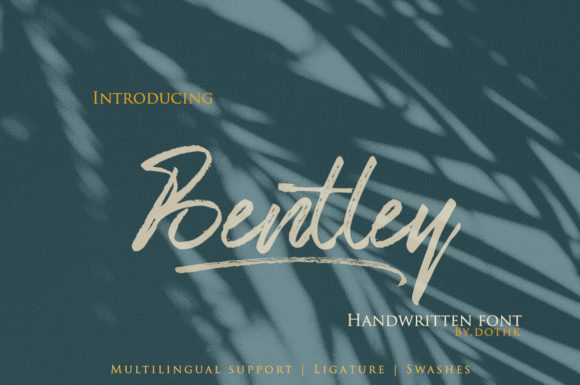
Choosing the right typeface is often the difference between a design that feels generic and one that resonates emotionally. Bentley Script has gained popularity among designers and creatives for its sweet, delicate, and brushed aesthetic. It captures a dainty and joyful energy that makes it particularly suitable for projects requiring a romantic or personalized touch, such as wedding invitations, greeting cards, and boutique branding. However, because it is a handwritten style with specific characteristics, it requires careful handling. Many users rush into using it without understanding its limitations, leading to legibility issues or designs that feel cluttered rather than elegant.
This guide explores common pitfalls when working with Bentley Script and provides practical advice on how to leverage its strengths while avoiding typical mistakes. Whether you are a seasoned graphic designer, a small business owner creating your own marketing materials, or a hobbyist planning a special event, understanding these nuances will help you achieve professional results.
Understanding the Character of Bentley Script
Before diving into application, it is essential to understand what makes this font unique. Bentley Script is not a standard serif or sans-serif typeface; it is a brushed handwritten font. This means it mimics the natural variation of ink flowing from a brush or pen onto paper. The strokes vary in thickness, and the connections between letters are fluid and organic. This inherent variability is what gives it charm, but it also introduces complexity.
People are drawn to Bentley Script because it conveys warmth and authenticity. In a digital world filled with rigid, geometric fonts, a typeface that looks hand-crafted stands out. It suggests effort, care, and personal attention. However, this same quality can become a liability if used incorrectly. Unlike highly structured fonts, handwritten scripts do not always align perfectly on a baseline, and their intricate details can disappear at smaller sizes.
Common Mistakes and How to Avoid Them
One of the most frequent errors designers make is using Bentley Script for body text or long paragraphs. While it is beautiful for headlines and short phrases, its delicate nature makes it difficult to read in dense blocks of text. The varying stroke widths and connected letters require more cognitive effort to decipher than a clean sans-serif font. When readers struggle to read your message, they are likely to disengage, regardless of how pretty the font looks.
The Fix: Reserve Bentley Script for titles, subtitles, quotes, or short call-to-action buttons. Pair it with a simple, highly legible font for the main content. A clean sans-serif or a neutral serif creates a balanced contrast that allows the script to shine without overwhelming the reader.
Ignoring Scale and Legibility
Another critical oversight is neglecting the impact of size on legibility. Because Bentley Script features fine, dainty lines, it can easily vanish or become blurry when scaled down too much. This is particularly problematic for mobile users, where screens are smaller and resolution varies. If you use this font for footer information, copyright notices, or small print on packaging, it may become illegible, frustrating your audience and diminishing the perceived quality of your design.
The Fix: Always test your design at actual size. Print a sample if possible, or view it on different devices. Ensure that the thinnest parts of the letters remain visible and distinct. If the font starts to look like a blur, increase the size or switch to a bolder typeface for that specific element.
Overusing Decorative Elements
Enthusiasm for the romantic feel of Bentley Script can lead to over-decoration. Some users add excessive swirls, shadows, or outlines to an already detailed font. This clutter obscures the natural beauty of the brush strokes and makes the text look amateurish. The font itself is the decoration; adding more visual noise detracts from its elegance.
The Fix: Embrace minimalism. Let the font speak for itself. Use ample white space around the text to give it room to breathe. A clean background and simple layout will highlight the joyful and delicate nature of the script far better than heavy effects.
Pairing Bentley Script with Other Fonts
Selecting complementary typefaces is crucial for a cohesive design. A common mistake is pairing Bentley Script with another decorative or handwritten font. This creates visual conflict, as both fonts compete for attention. The result is a chaotic design that lacks hierarchy and focus.
Better Approaches:
- Contrast with Sans-Serifs: Pair Bentley Script with a modern, geometric sans-serif like Montserrat or Lato. The simplicity of the sans-serif balances the complexity of the script.
- Harmonize with Serifs: For a more traditional or literary feel, combine it with a classic serif font like Garamond or Baskerville. This works well for wedding invitations or book covers.
- Maintain Hierarchy: Ensure there is a clear size and weight difference between the script and the supporting font. The script should typically be larger or more prominent if it is the focal point.
Technical Considerations and Licensing
When downloading or purchasing Bentley Script, it is vital to check the licensing terms. Many users assume that downloading a font from a free resource site grants them unlimited commercial use. This is a dangerous assumption that can lead to legal issues. Always verify whether the license allows for personal use only or if it extends to commercial projects, such as logos, products for sale, or client work.
Additionally, consider the file formats available. OpenType (OTF) files often support advanced typographic features like ligatures and alternate characters. These features can enhance the natural look of Bentley Script by providing variations in letter connections, preventing repetitive patterns that can make handwritten fonts look artificial. If you are using software that supports these features, take the time to explore them.
Evaluating Suitability for Your Project
Not every project benefits from a sweet and delicate font. Before committing to Bentley Script, ask yourself if it aligns with your brand voice or the tone of your event. For example, a tech startup aiming for a futuristic, robust image might find this font too soft and informal. Conversely, a bakery, a florist, or a wedding planner would find it perfectly aligned with their aesthetic.
Checklist for Decision Making:
- Tone Match: Does the joyful, romantic vibe fit the message?
- Readability: Will the audience be able to read it easily in the intended context?
- Medium: Is the output medium (print, web, social media) suitable for fine details?
- Longevity: Will this font still feel appropriate in a year or two, or is it too trendy?
Final Thoughts on Using Bentley Script
Bentley Script is a powerful tool for adding a personal, human touch to your designs. Its dainty and joyful character can elevate wedding invitations, cards, and branding materials when used with intention. By avoiding common mistakes such as poor pairing, incorrect scaling, and over-decoration, you can ensure that your designs remain professional and effective.
Remember that typography is not just about aesthetics; it is about communication. The goal is to convey your message clearly while evoking the desired emotion. With Bentley Script, you have the opportunity to create designs that feel warm, inviting, and authentically crafted. Take the time to experiment, test, and refine your usage, and you will find that this font can be a valuable asset in your creative toolkit.
For those looking to explore more options or deepen their understanding of typography, consider studying basic principles of type pairing and hierarchy. These foundational skills will help you make informed decisions not just with Bentley Script, but with any typeface you choose in the future. Happy designing.